 Solancer
Your freelance business in one Notion workspace
Solancer connects your clients, proposals, projects, tasks, time and invoices. Type each thing once. The dashboard tells you who to follow up with, what is due and who owes you money.
Core system works on the free Notion plan (the free Notion plan allows one chart, more need Plus or a free trial). One payment, no subscription.
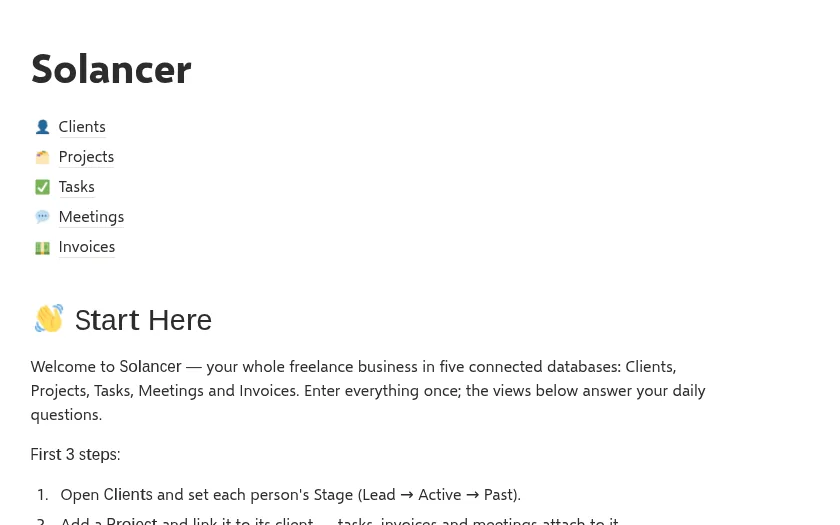
What is inside
Connected parts with sample data. Clients link to proposals, projects, tasks, time entries, meetings and invoices.
Command-center dashboard
Your day, your pipeline and your money on one page.
Client CRM
Track leads through to past clients, with follow-up reminders.
Project tracker
Status boards, deadlines and progress bars that update themselves.
Task manager
Today, this week, per project and waiting on client views.
Time tracking
Log hours against projects. Week and month tabs, a calendar and charts (the free Notion plan allows one chart, more need Plus or a trial). Paid adds billable rate and billable value.
Proposals
Track proposals by status on a pipeline board. Paid adds a win-rate chart and a decision formula.
Meeting notes
Linked to the client and the project they belong to.
Invoice tracker
Draft, sent, paid and overdue, with outstanding totals per client.
Income charts
Four charts in the paid version: income by month, invoiced by month, income by client, paid vs unpaid. Chart tabs need Notion Plus or a free trial. The free Notion plan allows one chart per workspace. Grouped table tabs show the same numbers on every plan.
Weekly Review
A 10 minute Friday routine that keeps the system clean.
Reports and date ranges
This week, Past month or a custom range on every database. Sum revenue for any period.
Backend / Databases hub
A page that maps how the databases connect, with maintenance notes.
Quick Start page
Relationship map, first 10 minutes, daily routine and troubleshooting.
Timeline and calendar
Project timeline from start and due dates. Task and meeting calendars.
Related items on every page
Open a client, project or task and see its linked items right on that page.
Locked structure
Databases are locked so a stray click cannot break your dashboards.
One-click Duplicate
Copy the whole workspace into your Notion in one click.
Sample data
Fictional clients and projects so you can see it work first.
Why Solancer
What makes it different from other Notion freelancer templates.
Try it free first
Solancer Lite is a real working template, free, downloaded from this site with no email and no redirect.
Built for the whole loop
Clients, proposals, projects, tasks, time, meetings and invoices are linked databases. Enter a detail once.
A routine, not just tables
Quick Start, a daily check and a 10 minute Friday Weekly Review tell you what to do next.
Hard to break
Locked database structure, plus a Backend hub that shows how everything is wired.
Answers about any period
Every database has This week, Past month and Custom range views.
Pay once
$39 one time. No subscription. Core system works on the free Notion plan; the free Notion plan allows one chart, more need Plus or a trial.
How it compares
| Feature | Solancer | Freelancer CRM & Projects | Freelance OS (Freelance OS) | Freelancer OS (AgentWave) | Freelance Essentials |
|---|---|---|---|---|---|
| Price | $39 (Lite free) | $12 | $39 (Lite $19) | $29 | $14 |
| Free version | Yes | Not listed | No, Lite is $19 | Not listed | Not listed |
| Meetings linked to clients | Yes | Not listed | Not listed | Not listed | Not listed |
| Weekly Review routine | Yes | Not listed | Not listed | Not listed | Not listed |
| Period views (week, month, custom) | Yes | Not listed | Not listed | Not listed | Not listed |
| Time tracking | Yes (hours; paid adds billable value) | Yes (hours) | Yes (Full) | Time estimates | Yes |
| Proposals | Yes (pipeline board; paid adds win rate) | Email scripts | Yes (Full) | Template | Not listed |
| Income charts | Yes (4 charts, paid) | Yes | Yes | Income tracker | Not listed |
Competitor columns come from each template's public Notion Marketplace listing, checked 2026-11-25. "Not listed" means the listing does not mention it, not that the template lacks it. In Solancer, income charts and the billable and win-rate extras are in the paid version; Lite has basic time tracking and proposals.
See it working
Real screens from inside the template, and a 37 second walkthrough. All names, hours and amounts in the screens and charts are fictional sample data.
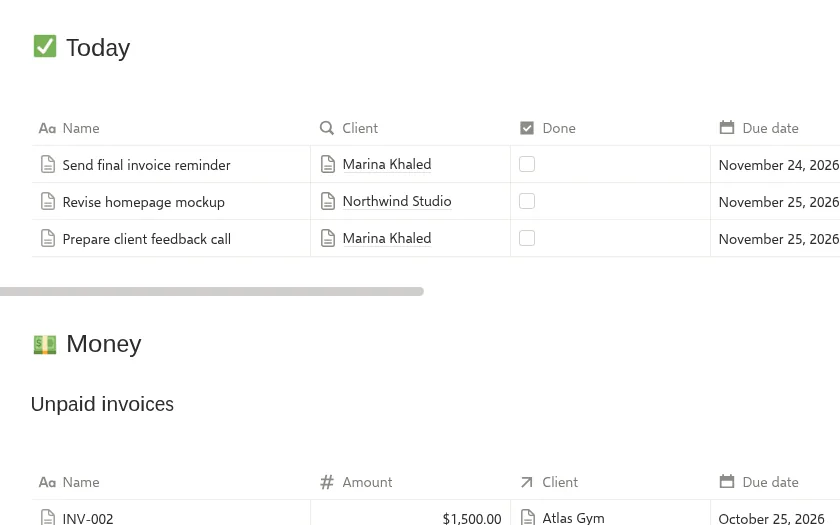
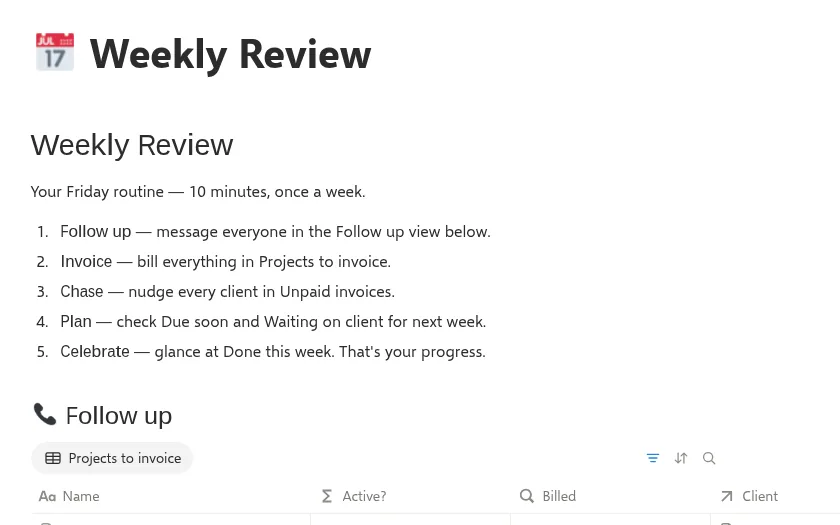
Time, proposals and income
Real screens from the full Solancer: hours by project and week, proposals on a pipeline board, and income charts.
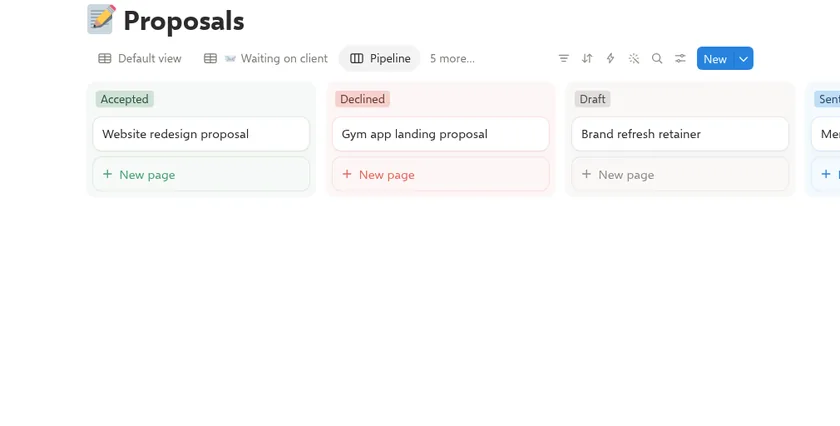
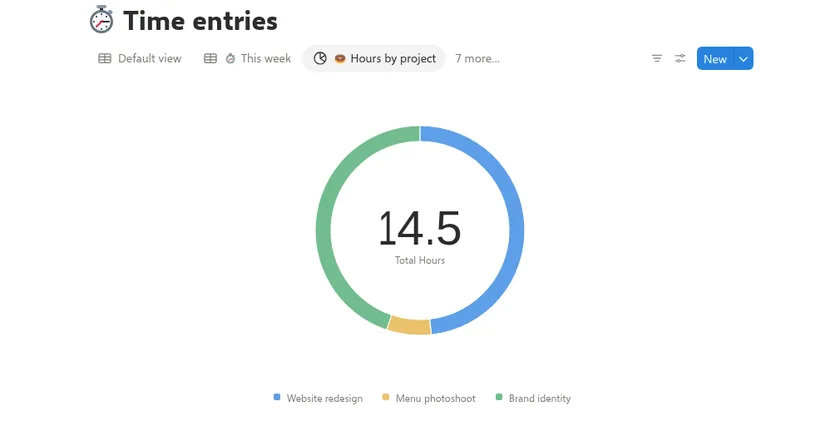
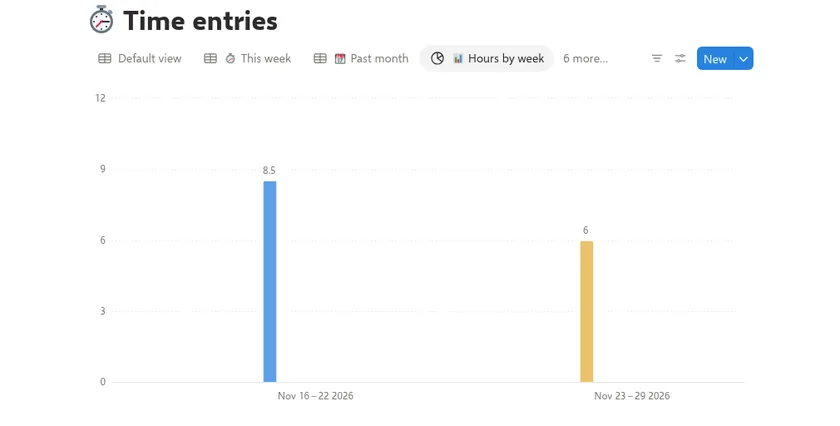
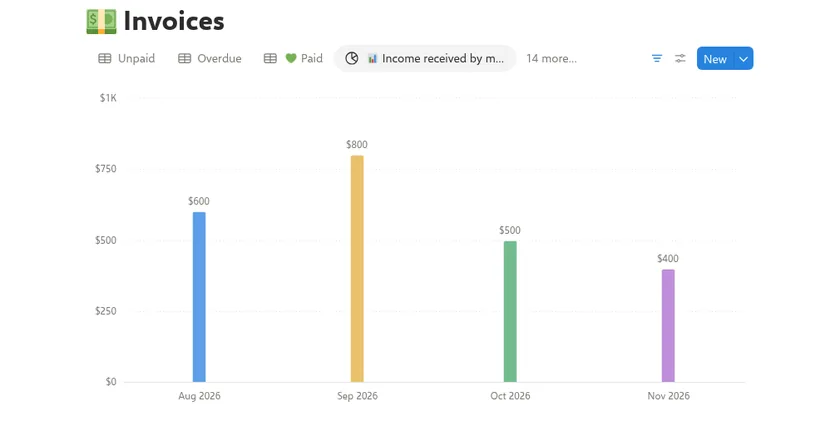
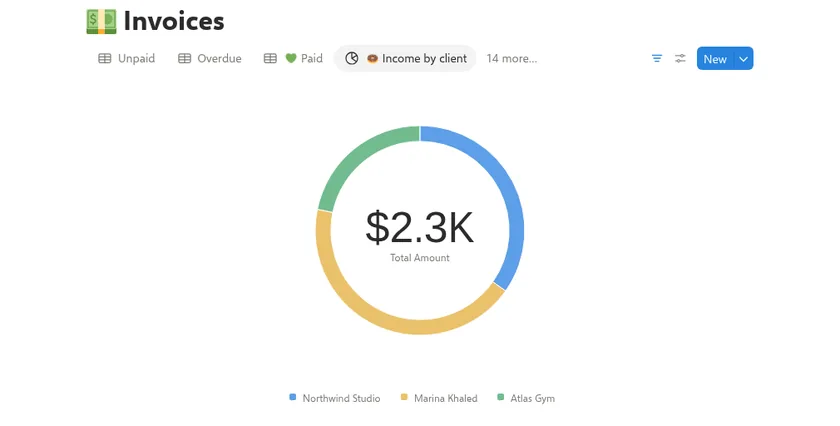
Chart tabs need Notion Plus or a free trial. The free Notion plan allows one chart per workspace. Grouped table tabs show the same numbers on every plan. Charts look blank on the public Notion preview and appear after you duplicate the template. Sample data shown.
How it works
- Open your template link and sign in to Notion. A free account works.
- Click the Duplicate icon (two overlapping squares, top right, next to the ... menu). Your private copy lands in your workspace.
- Follow the yellow Start Here box on the Home page. You are working in under 10 minutes.
Daily: open Home and check Today, about 2 minutes. Fridays: open Weekly Review, about 10 minutes. Lead says yes: set their Stage to Active and add a project. Project done: set Status to Done and it shows in To invoice until it is billed. Got paid: set Status to Paid and the client's outstanding drops to zero.
Pick your version
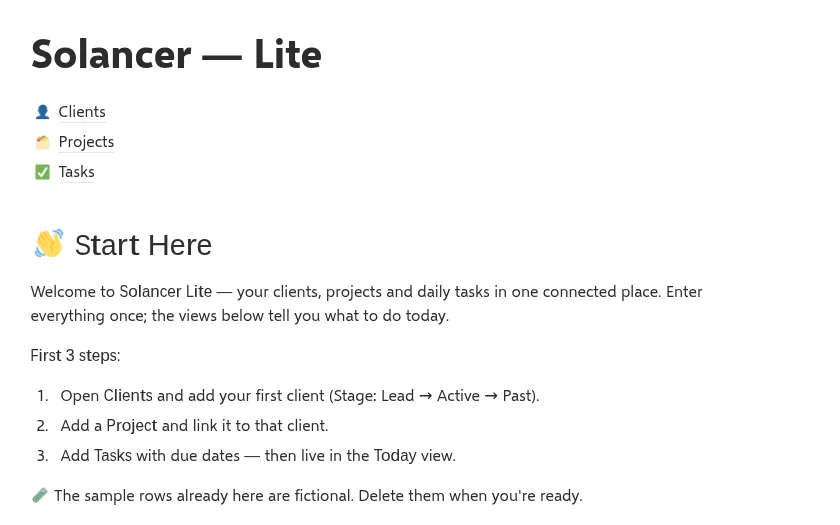
Solancer Lite
- Home dashboard
- Client CRM with follow-up reminders
- Project tracker with progress bars
- Task manager
- Time tracking: hours, week and month tabs, calendar, 2 charts (the free Notion plan allows one chart, more need Plus or a trial)
- Proposals: status tabs and pipeline board
- Quick Start, Reports and Backend pages
- Sample data
Solancer
Black Friday: $29 on Payhip and about $29 on Ko-fi (usual price $39), until the end of Dec 2, Cairo time. The discount applies automatically, no code needed. The Solancer store stays at $39.
- Everything in Lite
- Billable rate and billable value on time
- Win-rate chart and decision formula on proposals
- Invoice tracker with overdue alerts
- 4 income charts: income by month, invoiced by month, income by client, paid vs unpaid (the free Notion plan allows one chart, more need Plus or a trial)
- Meetings database
- Meeting notes linked to clients and projects
- Money dashboard
- Weekly Review page
- Upcoming meetings view
Pick the store you prefer. More options are coming.
Questions
What is Solancer?
Solancer is a Notion template for freelancers. It connects your clients, projects, tasks, time entries, proposals, meetings and invoices in one workspace, so you enter each detail once and the dashboard shows what needs attention.
Do I need a paid Notion plan?
No for almost everything. Relations, rollups, formulas, boards, calendars and grouped table views work on the free Notion plan. Notion charts (the time and income charts): the free Notion plan allows one chart per workspace, and more need Notion Plus or a free trial. You need a Notion account and one click on Duplicate to copy the template into your workspace.
What is the difference between Solancer and Solancer Lite?
Lite is free and covers the Home dashboard, Client CRM, Project tracker, Task manager, basic Time tracking (hours, week and month tabs, 2 charts; the free Notion plan allows one chart, more need Plus or a trial) and basic Proposals (status tabs and a pipeline board). The full Solancer adds billable rate and value on time, a win-rate chart and decision formula on proposals, Invoices with 4 income charts, Meetings, a Money dashboard and a Weekly Review page.
How much does Solancer cost?
Solancer is a one-time payment of $39 USD. There is no subscription. Solancer Lite costs nothing. Black Friday: $29 on Payhip (about $28.86 on Ko-fi) until the end of Dec 2, 2026, Cairo time, applied automatically with no code. The Solancer store stays at $39.
How do I get the template after buying?
You receive a PDF quick start guide with a private link to the template. Open it, sign in to Notion, click the Duplicate icon (two overlapping squares) at the top right of the Notion page, next to the ... menu, and your own copy lands in your workspace. The link always opens the latest version.
Does it include sample data?
Yes. Both versions come with fictional sample clients, projects and tasks so you can see a working system before you add your own. Delete the samples whenever you like.
Can I customize it?
Yes. You can add or rename views and select options. The database structure is locked so a stray click does not break the relations.
Is Solancer accounting, tax or legal advice?
No. It is an organization tool. Solancer is not affiliated with Notion.
Can I get a refund?
Solancer is a digital product. Refund terms depend on the platform you buy from, so check that platform's policy before you pay. The free Lite version lets you try the core system first.
Who it is for
Solo designers, developers, writers, marketers and consultants who want one place for client work without five apps. New to this? Read the guide to setting up a freelance CRM in Notion, or start with the free Lite version.